What Should AI Photo Enhancement Actually Cost? A No-Nonsense Guide
Free AI photo tools are everywhere, but most have hidden costs. I compared subscription plans, credit systems, and one-time purchases to figure out what is actually fair.
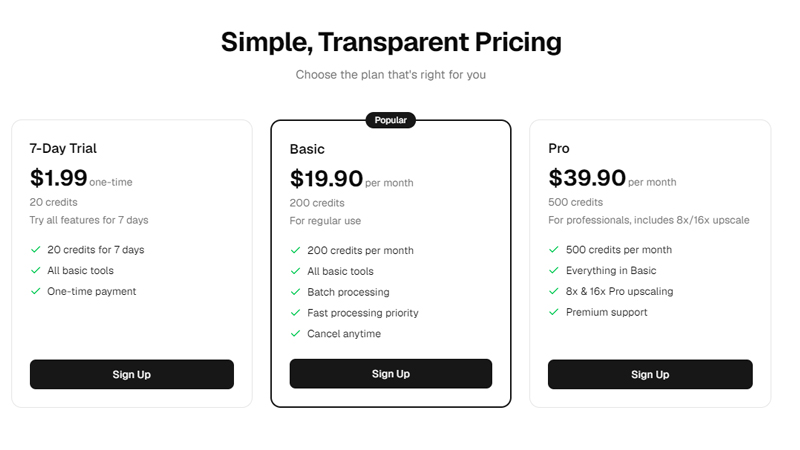
Fair AI photo enhancement pricing falls into three tiers:casual users should expect to pay $15-20/month for about 200 credits (roughly 50 standard upscales), heavy users $35-40/month for 500+ credits with batch processing, and one-off users can find credit packs in the $5-20 range. Genuinely free tools either watermark your output, severely limit resolution, or monetize your uploaded photos in ways you did not agree to.
Let me tell you about the first AI photo tool I tried. It was free. The results looked great in the preview — crisp, detailed, exactly what I wanted. Then I clicked download. A massive watermark across the middle. To remove it: $9.99 per photo.
That experience is common. A lot of these tools use a bait-and-switch model where the “free” version is basically a demo, and the real product starts at a price they do not tell you about until you have already invested time. Here is what I think is actually fair, based on testing a lot of services and understanding what they cost to run.
Why genuinely free AI tools do not exist
Running AI models is expensive. A single 4x upscale on a good GPU might cost the provider a few cents in compute. An 8x or 16x upscale on a high-end GPU like the NVIDIA A100 costs more — maybe 5 to 15 cents per run. That adds up fast when you are processing thousands of images.
If a service is free with no limits and no obvious business model, they are making money somehow. Often it is by using your uploaded photos for AI training, selling anonymized data, or running ads. I am not saying all free tools are shady — but you should understand the deal you are making.
Credit systems vs. unlimited plans
Most tools use a credit system where different operations cost different amounts. I actually prefer this over “unlimited” plans. Unlimited plans usually have hidden throttling or quality degradation for heavy users. With a credit system, you know exactly what you are getting.
A fair credit system charges more for operations that cost more to run. Background removal should be cheaper than 16x professional upscaling — and it usually is. Simple operations run 1-2 credits, complex ones run 8-16. That feels right to me.
Monthly vs. one-time: which should you choose?
If you are working through a big family photo collection over several months, a monthly plan makes sense. You get a set number of credits each month and can work at a steady pace. If you just need to process a handful of photos once, a one-time credit pack is better — no recurring charge, no subscription to remember to cancel.
I use the monthly Pro plan because I am always working on something, but my brother bought a credit pack for a one-time project and that was the right call for him. The flexibility to choose matters.
What fair pricing looks like
| User Type | Monthly Volume | Fair Price | Best Plan |
|---|---|---|---|
| Casual | ~50 photos/month | $15-20/month (200 credits) | Basic monthly |
| Heavy / Pro | ~125 photos/month | $35-40/month (500 credits) | Pro monthly |
| One-off | A few photos, once | $5-20 credit pack | Credit pack |
| Trial / New user | Test all features | $1.99 (20 credits, 7 days) | 7-day trial |
The key thing is transparency. You should know what each operation costs before you click the button, and you should be able to cancel anytime without jumping through hoops.
See what we charge. ClarifyPix pricing is transparent — every credit cost is shown up front, and you can cancel anytime.