How to Pick the Right AI Image Upscaler (Without Wasting Time or Money)
There are dozens of AI upscalers out there. After testing many of them, I put together a practical guide to picking the right one for what you actually need to do.
The right AI upscaler depends on three things: what you are upscaling (photos, digital art, or documents), what resolution you need (2x for screens, 4x for prints), and whether your images have faces that need separate restoration. For most people restoring family photos or preparing images for print, a Real-ESRGAN-based upscaler at 2x or 4x is the best combination of quality, speed, and cost.
When I first looked for an AI upscaler, I was overwhelmed. Every website promised the same thing: “stunning results” and “cutting-edge AI.” They all had glowing testimonials and before-and-after photos that looked amazing. How was I supposed to tell the difference?
After testing maybe 15 different tools over the past year — some good, some terrible, some that literally just applied a sharpen filter and called it AI — I have a framework for evaluating them. Here is what actually matters.
First: figure out what you actually need
Most people do not need a 16x professional upscaler. They need 2x or 4x for printing standard-size photos. If you are restoring old family photos, you probably also want scratch removal and face restoration. If you are working with product photos, you probably want background removal.
Write down what you need before you start comparing tools. Otherwise you will get sucked into feature lists that sound impressive but do not matter for your situation.
The AI model matters more than the brand
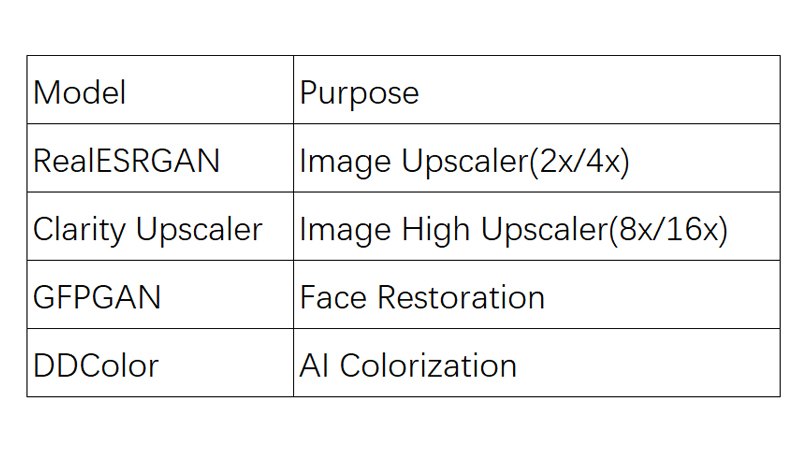
A lot of upscaler websites are just wrappers around the same few AI models. Here is what each model actually does:
| Model | Best For | Scale | Cost per Use |
|---|---|---|---|
| Real-ESRGAN | General photos, landscapes, objects | 2x, 4x | 2-4 credits |
| GFP-GAN | Blurry faces, portraits, group photos | Face only | 4 credits |
| DDColor | Black and white photo colorization | Color only | 2 credits |
| FLUX Kontext | Old photo restoration + color repair | Restoration | 10 credits |
If a tool does not tell you what AI model it is running, that is a red flag. It probably means they are using something outdated or proprietary that does not match the quality of these established models.
Check the privacy policy before uploading
I said this in another article but it bears repeating: read what happens to your photos. At minimum, look for a policy that says your images are deleted after processing and are not used for AI training. If you cannot find that information easily, assume the worst.
Watch out for “free” with hidden limits
I have been burned by this multiple times. A tool advertises as free but caps you at 3 photos per day or puts a watermark on your downloads or requires a credit card for the “$1.99 7-day trial” that auto-converts. A reasonable model: let people try the tool with a small number of free credits, be upfront about what paid plans cost, and do not hide the pricing until after they have invested time.
Batch processing is essential for large collections
If you have more than 20 photos, make sure the tool supports batch uploads. Processing photos one at a time through a web interface gets old very fast. Good batch processing shows you progress — “3 of 20 done” — and lets you download results collectively or individually.
The checklist I use now
Before committing to any AI photo tool, I run through this:
- Does it tell me which AI model it uses?
- Can I see pricing before I sign up?
- Does it delete my photos after processing?
- Can I process more than one photo at a time?
- Does it let me compare before and after?
- Can I cancel without contacting support?
If the answer to any of those is no, I keep looking. There are enough good options now that you do not need to compromise on the basics.
Start with a tool that ticks all the boxes. ClarifyPix shows you exactly what models it runs, what each operation costs, and what happens to your photos.