How to Colorize Black and White Photos with AI (2026 Guide)
Learn how to colorize black and white photos with AI. A step-by-step method for natural color, privacy safety, batch family archives, and honest limits.
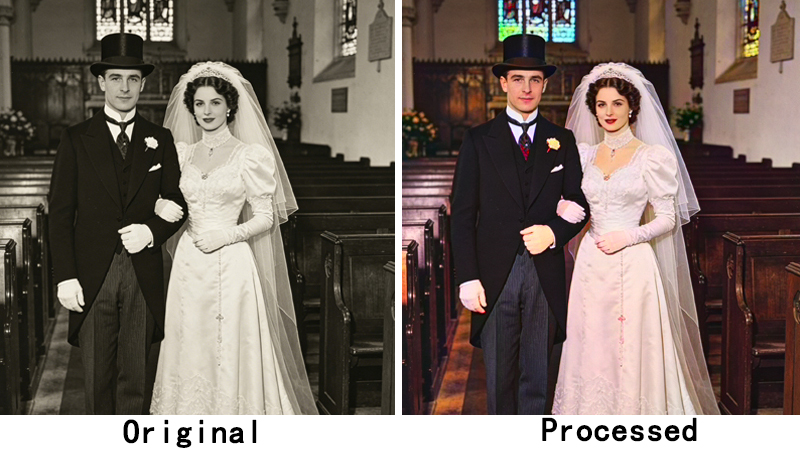
Maya had never seen her grandmother cry over a photograph. Then she lifted the cracked black-and-white wedding portrait from 1954, ran it through ClarifyPix, and handed her grandmother a full-color version of her own wedding day. "That was the exact blue of my dress," her grandmother whispered — and wept. If you want to colorize black and white photos like Maya did, 2026 is the easiest moment in history to try. Our AI photo colorizer for old photos can add lifelike, natural-looking color to a grayscale image in seconds, with no editing skills and no Photoshop required. In this guide you'll learn how AI colorization works, the step-by-step method, how to keep colors natural, protect your privacy, and batch-process a whole family archive at once.
Key takeaways
- AI colorizers like ClarifyPix's ddcolor model add natural color to grayscale photos in seconds — no editing skills needed.
- For the best results, repair scratches and fading before you colorize, then upscale for crisp prints.
- AI handles skies, grass, and skin tones reliably (about 85–95% accurate) but guesses at clothing and object colors.
- Your photos stay private: ClarifyPix deletes uploads about one hour after processing and never sells or trains on them.
- Batch colorization for family archives (2+ photos) is available on the Pro plan.
Why Colorize Old Black and White Photos?
A faded envelope of prints in a drawer is more than paper. When you colorize black and white photos, you open a doorway to people you may have never met, or to a version of your parents you never got to see. Color is what makes that doorway swing open.
Reconnect with family across generations
Children understand "Grandpa was young once" far more easily when they can see the green of his uniform or the red of his childhood home. Black-and-white flattens a face into a historical object; color restores it to a person. When a grandchild colorize old family photos for genealogy and shows the result at a family gathering, the whole room leans in.
Make history feel immediate
Dates on a textbook page feel distant. A colorized street scene from 1930 feels like a place you could walk into. Teachers and museum educators have known this for years: a color image pulls a viewer in, while a grayscale one keeps them distant. Color does not just decorate the past, it makes it feel real.
Create meaningful, frame-worthy gifts
A restored, colorized portrait printed and framed is one of the most thoughtful gifts you can give. It costs far less than a commissioned painting and carries more emotional weight than a store-bought present. For anniversaries, memorials, and reunions, a colorized photo says "I remembered, and I cared enough to do the work."
How AI Photo Colorization Actually Works
Before you click anything, here's the one mental model you need — so you can set expectations and spot a bad result. You do not need a computer-science degree; just a clear picture of what happens between upload and download.
From grayscale to color
A black-and-white photo stores only brightness at each pixel with no information about hue (the dimension a CIELAB color space is built to measure). Colorizing means inventing that missing data, and that is where a convolutional neural network (CNN) comes in.
The technique was pioneered in deep-learning research — see Zhang et al.'s foundational paper on automatic grayscale colorization from Berkeley (arXiv:1603.08511). Trained on millions of real color photos, the network learns patterns: skies tend blue, grass tends green, skin falls in a predictable range. Fed a grayscale image, it maps brightness and shape to the colors it has seen before.
How Does AI Colorize Black and White Photos?
AI colorizes black-and-white photos by passing the grayscale image through a convolutional neural network trained on millions of real color images. It predicts the most probable color for each pixel from shapes and surrounding context, then returns a full-color image in seconds.
ClarifyPix uses a dedicated model called ddcolor for this. Tuned for photo colorization rather than borrowed from a general model, it keeps faces and natural scenes balanced rather than oversaturated.
What AI gets right (sky, grass, skin) and where it guesses (clothing, cars, paint)
AI is confident when the world gives strong statistical clues. A clear sky is almost always blue. Grass is almost always green. Human skin, across ethnicities, lands in a narrow, learnable band. Those are the wins.
Where AI struggles is color ambiguity. A 1960s sedan could have been red, teal, or cream — the photo does not say, so the model guesses. A child's dress, a painted wall, a flag: all are essentially random for the network unless context hints otherwise. Knowing this split is the most useful thing before you judge a result.
Step-by-Step: How to Colorize a Black and White Photo
Here is the full workflow to colorize black and white photos, broken into five steps. Follow them in order and you will learn how to colorize black and white photos with ai better than uploading a random snapshot and hoping.
Step 1 — Scan or digitize at the highest quality
If your photo is still a physical print, quality starts at the scanner. Aim for 600 DPI or higher. The more pixels you capture, the more detail the AI has to work with, and the better your final print will look.
No scanner at home? Public libraries often offer flatbed scanners, and many local photo shops will digitize a stack for a small fee. If you don't have one, photograph the print in bright, even daylight with a tripod, shooting square-on to avoid glare, but a real scan is always sharper. For a deeper walkthrough, see how to scan old photos at the right DPI.
Step 2 — Repair damage first
Cracks, water stains, foxing (brown age spots), and faded contrast all confuse a colorizer. Damage is noise: the cleaner the input, the calmer the output. Use a restoration tool to heal scratches and even out tone before adding color. We cover this pipeline in the next section. If a photo is badly torn, stabilize it physically first so the scan does not shift.
Step 3 — Upload to an AI colorizer
Open ClarifyPix and choose the ddcolor model. Upload your cleaned grayscale image. The engine returns a colorized version within moments. You can also start from the combined workflow if you want restoration and colorization handled in sequence.
Try ClarifyPix — Upload one photo and watch ddcolor add natural color in seconds. Begin with the $1.99 7-day trial (20 credits) and explore the full workflow with no long-term commitment.
Step 4 — Review the result with a before/after slider
Never accept the first result blindly. ClarifyPix shows a before/after slider so you can drag across the image and compare the original grayscale with the colorized version pixel by pixel. Look closely at skin, clothing, and any painted or manufactured object. If a color reads wrong, say a too-pink sky or a neon-green jacket, jot it down for a manual nudge or a re-run.
Step 5 — Download and save all three versions
Do not just grab the colorized file and move on. Save three outputs: the original scan, the restored grayscale, and the final colorized image. Keep them together in one folder with the date in the filename. For printing, export at 300 DPI so the result stays crisp. Frame-worthy gifts deserve frame-worthy resolution.
Restore First, Then Colorize (the complete workflow)
Colorization is the most satisfying step, but rarely the first. Order matters more than most beginners realize.
Why order matters
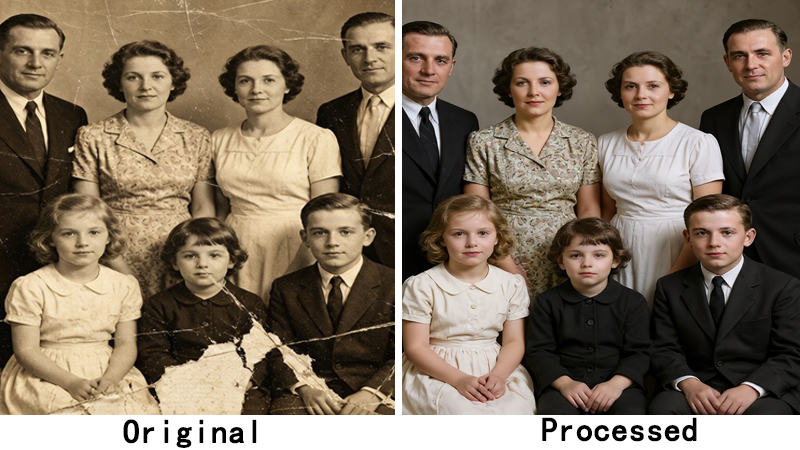
If you colorize a scratched, low-res photo, the AI paints color over the damage — cracks stay visible, now tinted. Worse, a small, soft source gives the colorizer little to base its guesses on, so colors drift generic and flat.
The fix is sequence: repair → colorize → enlarge. Repair removes noise, colorization adds realism, and upscaling restores the resolution you need for a print or a large screen. Done in this order, each step builds on a cleaner foundation than the last.
The ClarifyPix pipeline: restore (gfpgan/restore-image) → colorize (ddcolor) → upscale (realesrgan)
ClarifyPix is built around five specialized AI models; three form the restoration chain:
- gfpgan and restore-image rebuild faces and heal age damage on old photos.
- ddcolor applies the AI colorization described above.
- realesrgan upscales the result by 2x or 4x for sharp, print-ready output.
Run them in sequence, or let the platform handle it. A fifth model, background-remover, isolates a subject when needed. The takeaway: colorization is one link in a chain and works best once earlier links have done their job. For the full method, read our complete photo restoration workflow (restore → colorize → upscale).
Get Natural, Realistic Colors (Not Garish)
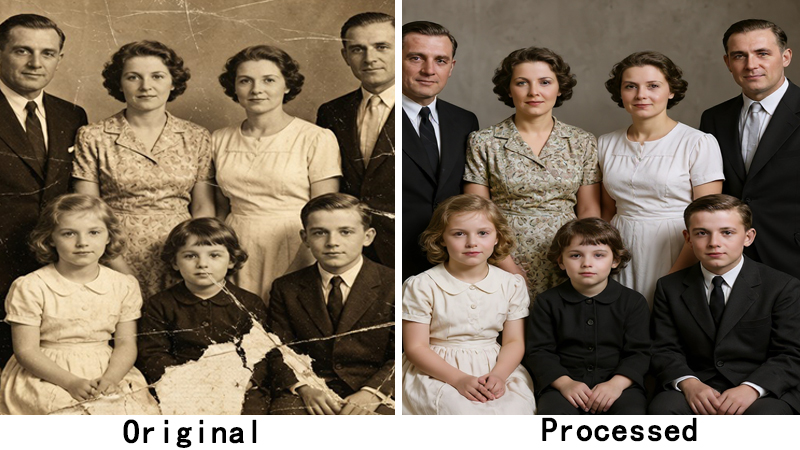
The most common complaint about AI colorization is "it looks fake." When you colorize black and white photos, aim for believable color, not a cartoon. Usually the 'fake' look comes from our expectations outrunning what color can honestly do. A quick read on color theory explains why muted, not neon, palettes read as real. A few habits keep results believable.
Common color mistakes and how to avoid them
It's tempting to crank the color until the image pops — don't. Real life is muted; dial saturation down a notch from where it feels "exciting" and the photo will feel "real."
A damaged source only gets worse in color. As covered, scratches and stains read as texture, and the colorizer tints them, so restore first.
What about a car, a dress, a painted sign? Those colors are guesses. If one looks off, treat it as a suggestion, not a fact.
And do not skip the slider check. Always compare before and after at full zoom. Subtle errors hide at thumbnail size and announce themselves at 100%.
For a deeper dive, see how to get natural, realistic colors instead of garish results.
When to fine-tune clothing or uniform colors
Some images carry meaning in their colors. A military uniform, a school emblem, a national flag: getting these wrong is not just an aesthetic miss, it can change the story the photo tells. AI will take its best guess, but for uniforms and insignia you should verify against a reference.
If you are working with service records or historical regalia, cross-check the branch, era, and unit coloring before you finalize. Our guide on colorizing military and historical uniforms accurately walks through era-specific palettes and common traps. When the color is the information, a few minutes of research beats a random neural guess.
Your Privacy Matters: Keep Family Memories Safe
Old family photos are not like a random stock photo. They show real people, real addresses, real children. Uploading them deserves a second thought — and a trustworthy tool.
Why uploading old family photos is sensitive
When families colorize black and white photos online, the question of trust matters as much as the speed of the result. A 1950s snapshot can reveal more than you expect: a house number, a school name, a license plate, a child's face. Once an image leaves your device, you are trusting the destination with your family's private history. Not every tool you find online treats that trust carefully, and some reuse uploads for their own purposes.
The Library of Congress (the U.S. national library), in its guidance on Preserving Family Photographs, reminds families that these materials are both irreplaceable and deeply personal. The same care you give to storage should extend to where you digitize and process them.
How ClarifyPix protects your photos
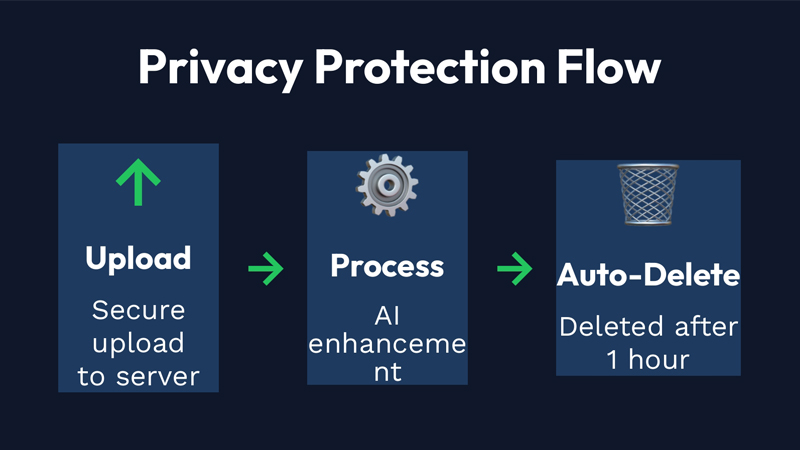
ClarifyPix is built privacy-first. When you upload a photo, it is processed and then automatically deleted about one hour after processing. The company does not sell your images, and it does not use them to train its models. Your grandparents' faces are not someone else's training data.
Your memories stay yours. ClarifyPix deletes uploads roughly 60 minutes after processing and never sells or trains on family photos.
For the full picture on data handling, read why privacy matters when you upload family photos (and how we protect yours).
Colorize More Than One: Batch for Family Archives
One photo is a project. A shoebox of one hundred is a different scale entirely — and that is exactly where most family historians get stuck.
Who needs batch colorization
If you have inherited a box of prints, scanned a relative's album, or volunteer at a historical society, one-at-a-time processing becomes a part-time job. Genealogists, educators, and families assembling reunion keepsakes all hit the same wall: the single-photo workflow does not scale.
How batch works on ClarifyPix
Batch colorization lets you queue two or more photos and process them together with consistent settings. No clicking through each file by hand. On ClarifyPix, batch is a Pro plan feature included alongside higher credit limits, so a whole archive colorizes in one sitting rather than one frame at a time.
Best Use Cases for AI Colorization
Where does this technology prove its worth when you colorize black and white photos? Everywhere a faded image carries emotional or educational weight.
Family photo restoration
The Okafor family spent a rainy Saturday digitizing a cracked box of 1950s prints. There was their father as a boy, their mother at a seaside pier, grandparents on a farm none had visited. They colorized the set through ClarifyPix and printed a modest album. On their parents' birthday, they slid it across the table. Their mother turned page after page in silence, then said, "I had forgotten the yellow of that kitchen." The album now sits open on the side table.
That is the quiet power of the tool: not perfection, but presence. restore and colorize your ancestors' photos for family history turns a buried box into a living conversation.
Genealogy and family history
Serious genealogists know a photo breaks through a research dead end faster than a census entry. A colorized image is more likely recognized by an older relative who can name the faces, and it is far more shareable in a family group chat — often where the best identifications happen. Color invites attention; grayscale is easy to scroll past.
Historical and educational images
Teachers use colorized primary sources to draw students in who think history is "boring black-and-white." Local libraries and historical societies colorize archive images for exhibits and newsletters. The caveat from the limits section still applies: label colorized history as interpreted, never documented fact, so you do not mislead viewers about what was truly recorded.
Creative and social-media projects
Creators revive vintage fashion posts, musicians colorize press photos for album art, and storytellers on short-video platforms such as TikTok use before/after sliders as content that fits the platform naturally. The reveal — dragging from gray to color — is satisfying to watch, which is why it performs well as short-form video. Just note in the caption that the color is AI-interpreted.
Why Choose ClarifyPix for Photo Colorization?
Most online colorizers do one thing: push a button and hope. ClarifyPix is built around three choices that matter for family photos.
- Privacy by default. Your uploads are deleted about one hour after processing, and are never sold or used to train models. Old family photos stay yours.
- Batch for archives. A Pro plan processes two or more photos together, so a shoebox of inherited prints colorizes in one sitting instead of one frame at a time.
- One workflow, not three tools. Restoration, colorization, and upscaling run on specialized models — gfpgan and restore-image, then ddcolor, then realesrgan — in sequence, so each step builds on a cleaner result.
We are honest about the limits too: on ambiguous colors, AI colorization is a smart guess, not a record of what was truly there. For the vast majority of family and educational projects, that is more than enough.
Understanding the Limits of AI Colorization
Here's the straight talk: AI colorization is a brilliant guess, not a time machine.
Color ambiguity
The model has no memory of your specific 1971 kitchen. When a surface could be any of several colors, the network picks the statistically likely one — which may not match reality. This is most visible on clothing, vehicles, interiors, and any painted object. Accept that some colors are inherently uncertain, and treat them as reversible choices rather than fixed facts.
When to cross-check with references
For images where color carries meaning — uniforms, flags, brand logos, period interiors — pause and verify. A reference photo from the same era, a unit history, or a period catalog can confirm or correct the guess. Cross-checking takes minutes and protects you from publishing something misleading. For purely sentimental family shots with no "correct" answer, relax: a plausible, pleasing color is more than good enough.
AI Colorization vs. Manual Colorization
How does AI stack up against a human retoucher in Photoshop? When people ask for the best ai to colorize old photos, the real answer depends on scale. Here is the honest comparison.
| Factor | AI Colorization | Manual Colorization |
|---|---|---|
| Processing time | Seconds per photo | Hours to days per photo |
| Cost | From $1.99 (7-day trial, 20 credits) / $19.90–$39.90 per month | $50–$150+ per hour for a professional retoucher |
| Accuracy | 85–95% on natural elements; guesses on ambiguous colors | Highest possible with a skilled artist and references |
| Consistency | Uniform across a whole album | Varies with the artist's method and mood |
| Batch | Built-in on Pro (2+ photos) | Practically impossible at scale |
| Skill required | None | Advanced Photoshop / retouching expertise |
Bottom line: AI takes speed, cost, and scale. A skilled human wins only on ceiling accuracy for the trickiest frames. For the vast majority of family and educational projects, AI is the right starting point — and a human touch can refine the few frames that need it.
Frequently Asked Questions
How accurate is AI photo colorization?
For natural elements — sky, grass, skin, water — accuracy runs about 85–95%. Clothing, cars, and other objects with arbitrary colors are probabilistic guesses. You can correct these using a period reference photo from the same era.
Can I colorize very old or damaged black and white photos?
Yes. The key is to repair first, then colorize. ClarifyPix chains gfpgan and restore-image for damage healing with ddcolor for colorization, so even cracked, faded prints can come back to life in color.
Is my photo private when I use an online colorizer?
With ClarifyPix, yes. Uploads are processed and then automatically deleted about one hour after processing. The service never sells your images and never uses them to train its models.
What's the best way to prepare a photo for colorization?
Scan at 600 DPI, repair scratches and stains first, crop away white borders, and make sure contrast is healthy. A clean, high-resolution grayscale gives the colorizer the most to work with.
Can I colorize multiple photos at once?
Yes — the Pro plan supports batch processing of 2+ photos, ideal for family archives and historical collections, so you are not clicking through each image by hand.
How much does it cost to colorize photos?
ClarifyPix offers a $1.99 7-day trial (20 credits), a Basic plan at $19.90/month (200 credits), and a Pro plan at $39.90/month (500 credits, which includes batch processing).
Conclusion
Maya's grandmother cried because color returned her youth. The Okafor family's album earned a different kind of tears, recognition, gratitude, the joy of seeing. That is what this technology is really for. You now know how AI colorization works and the five steps to a clean result. You know why restoration should come first, how to keep colors natural, how your privacy stays protected, and how to handle a whole archive at once. If you want to colorize black and white photos the honest way — repaired, private, and natural — you have the method in hand.
The hardest part is opening the box. Do it soon.
Start your first colorization with ClarifyPix. A $1.99 7-day trial gives you 20 credits to test the full workflow, while the Basic plan at $19.90/month (200 credits) suits a single cherished print and the Pro plan at $39.90/month (500 credits) adds batch processing for a whole family archive. Your memories deserve to be seen in color.